
If you are buying a PVC card printer in Malaysia, the first technical choice to understand is whether the printer is direct-to-card (DTC) or retransfer. The two methods put the image on the card in different ways, and that affects edge-to-edge printing, card types, durability and running cost.
The short answer: DTC is usually enough for standard colour ID cards printed in moderate volumes. Retransfer is worth considering when you need full edge-to-edge colour, a more durable finish, or printing on non-standard cards. But the printer's published specification matters more than the category name, as the sections below explain.
What is direct-to-card printing?
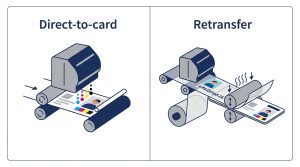
A direct-to-card printer applies the image straight onto the surface of the card. There is no intermediate film, so the process has fewer steps, fewer consumables and usually a smaller machine.
What is retransfer printing?
A retransfer printer prints the image in mirror image onto a clear plastic film. Heat and pressure then bond the film to the card, so the image sits under a protective layer. Some manufacturers call this "reverse transfer". Magicard uses that name for its Prima 8.
Which brands use which method?
Manufacturers do not always use the same words, so the table below follows each manufacturer's own product wording. Check the datasheet of the exact model before you buy, because ranges change.
| Brand | Model(s) | Method, as the manufacturer describes it |
|---|---|---|
| Evolis | Primacy 2, Zenius 2, Elypso, Badgy200 | Direct-to-card (Primacy 2 and Zenius 2 also offer rewrite) |
| Evolis | Agilia, Avansia | Retransfer |
| HID Fargo | DTC series, for example DTC1250e and DTC4500e | Direct-to-card |
| HID Fargo | HDP series | Retransfer (HID calls its method HDP, High Definition Printing) |
| Zebra | ZXP Series 8 and ZXP Series 9 | Retransfer |
| Zebra | ZXP Series 7 | Check the datasheet for the model you are considering |
| Magicard | Pronto100, E+, 300, 600, PCP100, PCP FLEX+ | Direct-to-card |
| Magicard | Prima 8 | Reverse transfer (retransfer) |
| Entrust Sigma | DS1, DS2 | Direct-to-card |
| Dascom | DC-7600, DC-8600 | Retransfer |
| HiTi | CS-200e | Labelled direct-to-card, using dye sublimation (see the note below) |
Common myths that are not always true
"Direct-to-card always leaves a white border"
Not always. HiTi's CS-200e brochure describes edge-to-edge printing, even though HiTi labels the process direct-to-card. Check the spec sheet for each model rather than relying on the method name alone.
"Retransfer always means higher resolution"
Not always. Zebra offers the ZXP Series 9 at either 300 dpi or 600 dpi. Dascom's DC-7600 and DC-8600 are rated at 600 dpi. Compare the resolution on each datasheet.
"Direct-to-card is always the cheaper option"
It is usually cheaper to buy, but not always cheaper to run. Printer price is only one part of the cost. Manufacturers and distributors generally describe retransfer equipment and consumables as more expensive, but the real answer depends on the cost per card for your volume, so calculate it using the quotes you actually receive.
How to choose: four practical questions
1. Do your cards need full edge-to-edge printing?
Retransfer printing is designed for full edge-to-edge coverage, and Zebra and Dascom both state this for their retransfer models. HiTi also describes edge-to-edge printing for the CS-200e. Confirm the edge-to-edge claim for the exact model you are considering.
2. What card material will you print on?
Standard smooth PVC is the simplest case. Some industry sources say direct-to-card works best on smooth standard PVC and is less effective on textured or non-standard materials. These are general claims, so test a sample card made from the material you will actually use.
3. How durable must the card be?
Retransfer leaves the image under a protective film, which manufacturers say resists wear. A direct-to-card image sits on the surface and can be more prone to scratching. A lamination module can help. If the card will be carried every day for years, such as a staff or hospital card, ask for a sample and test it.
4. How many cards per month, and what does each card cost?
Use this formula:
Cost per card = (Price of consumables for one roll or film ÷ Cards per roll or film) + Price of one blank card
Calculate it for each printer you are considering, using the quotes you receive. Ask for the warranty terms in writing, including whether the print head is covered and for how long.
Examples
A company printing 50 staff cards a month
Volume is low and the cards are usually standard colour PVC with a photo and a name. A direct-to-card printer is normally enough, and its lower upfront cost is the main advantage. Choose retransfer only if the design needs colour right to the edge, or the cards must last for years in heavy daily use.
A school needing 2,000 student cards
Volume is higher, so consumable yield matters more than the printer price. Calculate the cost of all 2,000 cards for each option. Check the warranty and how quickly the supplier can repair the printer. If the design has a full-bleed photo, edge-to-edge capability may decide the choice.
Questions to ask your supplier before you buy
- Is this exact model direct-to-card or retransfer, according to its datasheet?
- What is the printer's resolution in dpi, and does it support edge-to-edge printing?
- What is the price and yield of every consumable needed for full-colour printing?
- Is the print head covered by the warranty, and for how long?
- Where will repairs be done, and how long do they usually take?
- Can you print a sample on the card material we will use?
Frequently asked questions
Is direct-to-card printing lower quality?
Not necessarily. Print quality depends on the specific printer, its resolution and the card material. Some direct-to-card models are rated for edge-to-edge printing. Ask for a sample of your own design before you decide.
Which technology is better for a small business?
For most small businesses printing standard ID cards in moderate volumes, a direct-to-card printer is usually the practical choice. Move to retransfer if the design, durability or card material requires it.
Printers mentioned in this guide
These models are available from Copro Asia Resources. Each link goes to the product page for the model named:
- Evolis Primacy 2 Duplex (direct-to-card)
- Evolis Zenius 2 (direct-to-card)
- HID Fargo DTC1250e (direct-to-card)
- Evolis Agilia (retransfer)
- Swiftpro K60 Dual Sided (retransfer)
Browse all PVC ID card printers, or see our consumables for ribbons and cards.
How Copro Asia Resources can help
We supply and service card printers from several manufacturers, and we can compare models against your card design, monthly volume and budget. Tell us your card type, how many cards you print each month and whether your design needs edge-to-edge colour. We will recommend the technology that suits the job.
Contact Copro Asia Resources on WhatsApp at +6011-1057 4388 or by email at [email protected].
Model details in this article were checked against manufacturer and distributor pages on 19 October 2026. Specifications and ranges change, so confirm them before you order.